
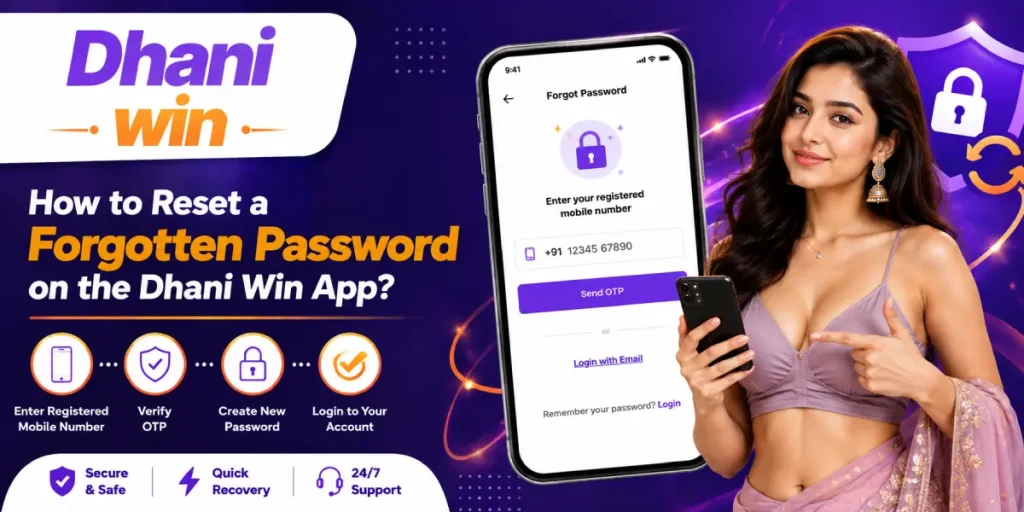
Forgetting your login password can be frustrating, especially when you need quick access to your Dhani Win account. Fortunately, a forgotten password usually does not mean that you need to create a new account.
If you are dealing with a Dhani Win app forgot password issue, the usual recovery process involves opening the login page, selecting the password recovery option, verifying your registered mobile number or email with an OTP, and creating a new password.
This article explains how to reset your password in Dhani Win, what to do when the OTP does not arrive, how to handle an invalid mobile number error, and what you can try if the Dhani Win app is not opening or login is failing.
How to Reset Password in Dhani Win App
If you remember the mobile number or email address connected to your account, resetting the password should be straightforward.
Step 1: Open the Dhani Win Login Page
Launch the Dhani Win app or open the official website using your mobile browser.
Go to the login section and look for an option such as “Forgot Password” or “Reset Password.”
Step 2: Select Forgot Password
Tap the password recovery option instead of repeatedly entering different passwords.
This is important because multiple incorrect login attempts can sometimes result in temporary restrictions or account lock issues.
Step 3: Enter Your Registered Details
Enter the mobile number or email address associated with your Dhani Win account.
Check every digit carefully before continuing. If you receive an invalid mobile number message, make sure you are using the same number that was originally registered with the account.
Step 4: Request the OTP
After submitting your registered details, request the verification OTP.
The OTP is used to confirm that you have access to the account’s registered contact information.
Step 5: Verify the OTP
Enter the OTP exactly as received.
Do not share the OTP with another person, including someone claiming to be a support representative.
Step 6: Create a New Password
Once verification is successful, enter your new password and confirm it.
Use a password that is difficult to guess but easy for you to remember. If the reset page displays specific password requirements, follow those requirements exactly.
Step 7: Log In Again
Return to the login screen and enter your registered details with the new password.
If the password has been successfully changed, you should be able to access your account again.
Dhani Win Password Change Link: Where Should You Look?
Users often search for a Dhani Win password change link when they cannot remember their existing password.
Rather than using random links from search results, open the official Dhani Win App login page and use the password recovery option shown there. The current login information lists Forgot Password as the recovery method and indicates verification through a registered mobile number or email.
Avoid entering your phone number, password, or OTP on websites that you do not recognise.
Dhani Win Forgot Password OTP Not Received
One of the most common problems during password recovery is not receiving the OTP.
If you are facing a Dhani Win forgot password OTP not received problem, try these steps:
- Check whether your registered mobile number is correct.
- Make sure your phone has a working network connection.
- Wait for a short period before requesting another OTP.
- Avoid pressing the resend button repeatedly.
- Check whether SMS messages are being blocked or filtered.
- Restart your phone and try the recovery process again.
- If an email option is available, check the correct email inbox and spam folder.
If the OTP still does not arrive, contact Dhani Win App support through the available support channel rather than repeatedly attempting the reset.
Dhani Win Password Reset Invalid Mobile Number
An invalid mobile number message usually means that the number entered does not match the account information required by the recovery system.
Before assuming that your account is inaccessible, check:
- Whether you entered the correct mobile number.
- Whether you included the correct country code, if requested.
- Whether you are using the number originally associated with the account.
- Whether there is an extra space or incorrect digit.
- Whether you accidentally entered a different number used for another account.
If you no longer have access to your registered number, the normal OTP-based recovery process may not work. In that situation, contacting official support is the safer option.
Dhani Win Login Failed Incorrect Credentials
Seeing login failed – incorrect credentials does not necessarily mean that your account is blocked.
First, check whether:
- Your mobile number or username is correct.
- Caps Lock is affecting your password.
- You accidentally added spaces while entering the password.
- You recently changed your password and are still using the old one.
- Your browser or password manager has automatically filled an outdated password.
If you are certain that the password is incorrect, stop trying random combinations and use the Forgot Password option.
Dhani Win App Password Format Example
A common search is Dhani Win app password format example.
The exact password requirements should be taken from the password creation screen because requirements can change. If the reset form does not clearly explain the criteria, a strong password can generally include:
- Uppercase letters
- Lowercase letters
- Numbers
- Special characters
- At least several characters in length
For example, instead of using an easily guessed password such as your name or date of birth, create a unique combination that is not used on other websites.
Never use your OTP as your password.
Dhani Win App Lock Reset
If repeated failed login attempts have caused an account or app lock, do not continue entering different passwords.
First, wait for any temporary restriction to clear and try the standard password recovery process. If the account remains locked after successfully resetting the password, contact the platform’s support team and explain that you cannot access your account.
An app lock reset and a forgotten-password reset may not always be the same process, so follow the instructions displayed by the app.
Dhani Win App Ka Password Bhool Gaye Kya Kare?
Agar aap Dhani Win app ka password bhool gaye, to baar-baar galat password enter karne ke bajay login page par Forgot Password option check karein.
Apne registered mobile number ya email details enter karein, OTP verification complete karein aur uske baad naya password create karein.
Agar OTP nahi aa raha hai ya registered number accept nahi ho raha, to pehle apni details aur network connection check karein. Problem continue hone par official support se contact karna better option hai.
Dhani Win App Me Naya Password Kaise Banaye?
Dhani Win app mein naya password kaise banaye iska simple process password recovery option se start hota hai.
Login page open karein, Forgot Password select karein, registered details enter karein aur OTP verify karein. Verification complete hone ke baad password reset screen par naya password enter karke confirm karein.
Naya password unique rakhein aur use kisi doosre account ke password ke saath repeat na karein.
Dhani Win Password Change Karne Ka Tarika
Agar aapko current password yaad hai, to account ke profile, security, ya password settings section me Change Password option available ho sakta hai.
Agar current password yaad nahi hai, to normal password change ke bajay Forgot Password recovery process use karein.
Is difference ko samajhna important hai:
| Situation | Recommended Action |
|---|---|
| Current password yaad hai | Change Password option |
| Password bhool gaye | Forgot Password |
| OTP nahi aa raha | Check number/network and retry |
| Mobile number invalid | Verify registered number |
| Login repeatedly fails | Stop guessing and reset password |
| Account appears locked | Wait or contact support |
Dhani Win Login OTP Problem Solution
If you are searching for a Dhani Win login OTP problem solution, start with the basics before trying advanced troubleshooting.
Check your internet connection, confirm that the registered number is correct, wait before requesting another OTP, and restart the app if necessary.
You can also try opening the login page in another browser or clearing the browser cache if the page itself appears stuck.
If the OTP screen continues showing a loading message or remains on “Generating OTP,” avoid repeatedly tapping the button. Close the app or browser, reopen it, and try again after a short interval.
Dhani Win App Login Problem Today
Sometimes the problem may not be your password at all.
If you are experiencing a Dhani Win app login problem today, check whether the website or app is loading normally first. You can try:
- Switching between Wi-Fi and mobile data.
- Restarting the app.
- Clearing temporary browser/app cache.
- Trying another browser.
- Updating the app if an update is available.
- Checking whether other internet services are working normally.
If login works on another device or browser, the issue may be related to your original device or browser rather than your account.
Dhani Win App Open Nahi Ho Raha Hai
Agar Dhani Win app open nahi ho raha hai, sabse pehle phone ka internet connection check karein.
Uske baad app ko completely close karke dobara open karein. Android users temporary cache clear karke bhi try kar sakte hain.
If the app still does not open, check whether the website is accessible through your browser. Avoid downloading APK files from unknown third-party sources simply because the app is not opening.
What If I Lost My Registered SIM Card?
A more complicated situation occurs when you have both forgotten the password and lost access to the registered SIM card.
In this case, an OTP sent to the old number may not be accessible. Do not try to bypass the verification system or use someone else’s number.
Instead, contact the platform’s official support team and explain that you no longer have access to the registered number. Be prepared to provide legitimate account information that may help them verify ownership.
Can I Reset Dhani Win Password Using Email Instead of Phone Number?
This depends on which recovery methods are available on the current login or password-reset screen.
The available Dhani Win App login information indicates that the registered mobile number or email may be used for account access and that OTP verification can be required.
If the password-reset screen gives you an email recovery option, you can use the registered email. If it only accepts the registered mobile number, you should use that method or contact official support.
Do not assume that any email address can be used to recover an account.
How to Keep My New Dhani Win Password Safe
After successfully resetting your password, take a few precautions to avoid another login problem.
Use a Unique Password
Do not reuse the same password across multiple gaming, email, banking, or social media accounts.
Don’t Share Your OTP
An OTP is intended for account verification. Never send it to another person.
Avoid Saving Passwords on Shared Devices
If you are using a public or shared phone/computer, avoid saving your login credentials.
Be Careful With Password Reset Links
Use the official Dhani Win login or support route instead of clicking suspicious links sent through messages or social media.
Frequently Asked Questions
How do I reset my forgotten Dhani Win password?
Open the Dhani Win App login page, select Forgot Password, enter your registered details, verify the OTP, and create a new password.
What should I do if I don’t receive the Dhani Win password reset OTP?
Check your registered number, network connection, SMS inbox, and wait before requesting another OTP. If the issue continues, contact official support.
Why does Dhani Win say my mobile number is invalid?
The number may not match the details associated with the account. Recheck every digit and make sure you are using the registered number.
Can I reset my Dhani Win password without my registered SIM?
If you cannot receive the required OTP, the normal recovery process may not work. Contact official support and explain that you no longer have access to the registered SIM.
What should I do if Dhani Win login keeps saying incorrect credentials?
Check your login details once, then use Forgot Password if you cannot confirm the password. Avoid repeatedly entering random passwords.
Can I use an email address to reset my Dhani Win App password?
Use email only if the current recovery screen provides an email-based recovery option. Otherwise, use the registered mobile number or contact support.
What should I do if the Dhani Win app is not opening?
Check your internet connection, restart the app, clear temporary cache, try another browser or device, and check whether the web version is accessible.